Sure, Apple Maps has gone through its share of growing pains over the years and many still turn their nose up towards the service in favor of Google Maps. However, Apple has dramatically improved their Maps app and in some ways it has surpassed Google Maps on the iPhone.
Getting Directions in Apple Maps
The process of typing in addresses within the app to get directions is similar to most every other mapping app released on iOS, and Android for that matter, in recent years. What pushes Apple Maps to the head of the pack is Siri integration. With the long awaited introduction of the Siri API announced by Apple on Monday this may change, but for the time being the ability to ask Siri for directions is the app’s best feature.
Rather than going through the clunky process of typing in addresses, you can simply summon Siri and ask her to get you directions to where you need to go. To take it a step further, as long as you’ve set up your own contact information with Siri, you can ask Siri to “take you home”, or a variation of that command, and directions to your home location will be brought up and turn-by-turn navigation will begin automatically.
Sharing Locations in Apple Maps
Another process Apple has made painless within the Maps app is being able to share locations. When meeting with someone at a location they may not be familiar with, the old process required you to play the role of navigator and stay on the phone providing directions. Since GPS devices and smartphone navigation caught on in recent years, the process got a bit easier and all you had to do was text or email and address over.
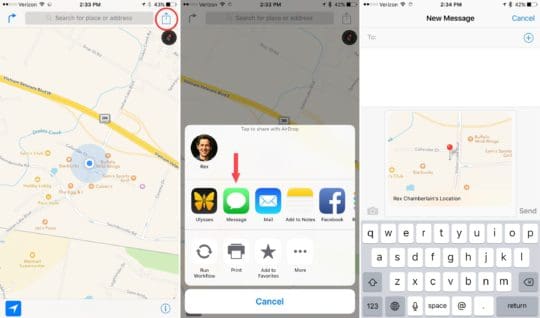
However, using Apple’s Maps app, the process is now more fluid than ever. You can either share your location or the location of another place via text, email or in a variety of other ways using the share extension within the Maps app. Furthermore, once you’ve sent a location over, the other individual need only tap the image to open up their own Maps app and begin navigation.
Adding Locations to the Notes App
I recently wrote another article all about the improvements in Apple’s built-in Notes app. One such improvement is the Notes share extension now available. One excellent use is being able to save any location to a Note for future use and reference.
This could come in handy in various scenarios, whether that’s planning for a trip, documenting good meeting locations for business or whatever you may think of. Going through the same process to share a location via text or email, simply choose the Notes app in the share menu instead. Here, you have the option to save the location to a specific note.
If you were burned by Apple’s Maps app in the past and it’s been a while since you given it a second chance, it’s about time you did so. The app can now hold its own against Google Maps, and with its deep integration in iOS there are some extra benefits you can’t get with Google’s option.